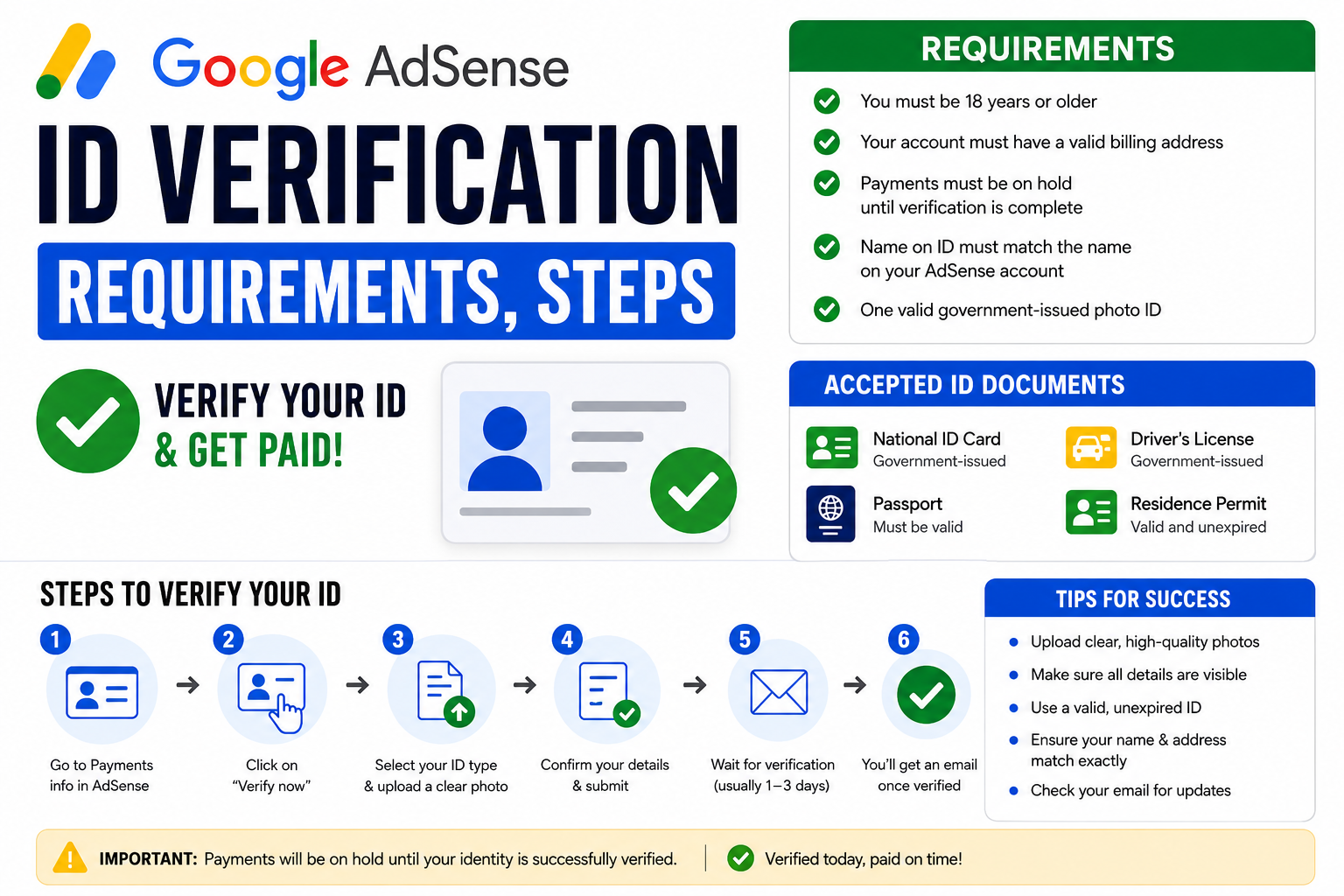
Google AdSense ID verification is an important step if you want to keep earning from AdSense without payment or account restrictions. In 2026, Google may ask you to verify your identity before you can continue using certain AdSense features, receive payments, or complete the account verification process.
The good news is that Google AdSense ID verification is not complicated when your information is accurate and your document is valid. The problem starts when the name on your AdSense account does not match your identification document, your photo is unclear, or you submit a document that Google cannot verify.
🚀 Learn AI Video Creation & Start Building Digital Skills
Want to learn how to create AI videos for YouTube, TikTok, Facebook, and other platforms? Choose an option below to get started.
🎥 Start AI Video Training 📚 Watch Free AI Lessons ⭐ Join the Premium AI Program✔ Beginner Friendly | ✔ Learn at Your Own Pace | ✔ Practical AI Video Skills
In this guide, you will learn what Google AdSense ID verification means, the requirements, which documents you may need, how to complete the process, what happens after submission, and what to do if Google rejects your verification.
What Is Google AdSense ID Verification?
Google AdSense ID verification is the process Google uses to confirm that you are the real person behind an AdSense account.
When Google asks you to verify your identity, you may need to provide a government-issued identification document. Depending on your location and account, Google may also require additional information or verification steps.
The purpose is simple: Google wants to make sure that the person receiving AdSense earnings is a legitimate account holder.
This is different from verifying your website.
Your website verification confirms that you control a website or platform where AdSense ads are displayed. Identity verification, on the other hand, confirms who you are.
You may therefore complete several different AdSense verification requirements during the life of your account.
These can include:
Identity verification
Address verification
Payment information verification
Tax information
Website or publisher verification
Google does not necessarily ask every publisher to complete all of these steps at the same time.
If your AdSense account specifically shows an identity verification notification, follow the instructions displayed inside your account.
Why Does Google Require AdSense ID Verification?
Google has millions of publishers using its advertising platforms. It needs systems that help prevent fake accounts, fraudulent activity, payment abuse, and attempts to manipulate advertising systems.
Identity verification is one of those systems.
Google may ask you to verify your identity when you reach a particular stage of your account or when additional verification is required.
The exact reason can vary from one account to another.
The important thing is this:
If Google asks you to verify your identity, do not ignore the request.
Ignoring an identity verification requirement can eventually affect your ability to receive payments or continue using your AdSense account.
Google AdSense ID Verification Requirements 2026
Before starting the verification process, prepare the information and documents you may need.
The exact requirements can vary depending on your country and what Google displays in your AdSense account. However, you should generally expect the following.
1. A Valid Government-Issued ID
The most important requirement is usually an acceptable government-issued identification document.
Depending on your country, Google may accept documents such as:
Passport
National identity card
Driver’s license
Other government-issued identification documents
Do not assume that every ID will automatically be accepted.
Google determines which documents are acceptable for your verification process.
The safest approach is to check the verification screen in your AdSense account before uploading anything.
2. Your Legal Name Should Match
This is one of the biggest issues publishers encounter.
The name on your AdSense payment profile should correspond with your identity document.
For example, suppose your government ID says:
John Michael Smith
But your AdSense payment profile says:
John Smith
That difference could create a problem.
Do not casually create an AdSense account using a nickname, shortened name, business name, or someone else’s name and expect identity verification to work smoothly.
Your payment information should be accurate from the beginning.
3. Your Document Must Be Valid
Do not upload an expired document if Google requires a valid document.
Check the expiration date before submitting.
If your driver’s license or passport has expired, use an acceptable current document instead.
4. Your ID Must Be Clear
Google needs to be able to read the information on your document.
Avoid uploading:
Blurry photographs
Dark images
Images with reflections
Cut-off documents
Screenshots of poor-quality scans
Heavily compressed images
Photos where important information is hidden
The document should be easy to read.
5. Your Information Must Be Accurate
Your name, date of birth, address, and other details should not be deliberately altered.
Do not edit an ID document using Photoshop or another image editor.
Do not manipulate the document to make it appear different.
If Google cannot authenticate the information, your verification may fail.
What Documents Can You Use for AdSense ID Verification?
The documents available to you depend on your country.
Generally, government-issued identification documents are the best place to start.
For example, a publisher may be able to use a passport, national identity document, or driver’s license if that document is supported in their country.
However, this is where many online guides make a mistake.
They publish a universal list of documents and tell everyone to upload a specific ID.
That is not reliable.
Google can have different document requirements depending on the country, account, and verification flow.
Therefore, the verification page shown inside your AdSense account should be treated as the final authority.
If Google specifically tells you to provide a particular type of document, use that document if you have it.
How to Complete Google AdSense ID Verification
Now let’s look at the process.
Step 1: Sign In to Your AdSense Account
Go to your Google AdSense account and sign in using the Google account connected to your publisher account.
Once inside, look for a notification requesting identity verification.
You may see a message asking you to verify your identity or complete an account verification requirement.
Click the verification option.
Do not use links from random emails or messages to submit sensitive identification documents.
Instead, access AdSense directly through your normal Google account.
Step 2: Review the Verification Instructions
Before uploading your ID, read the instructions Google provides.
This step looks boring, but it can save you a lot of trouble.
Check:
Which documents are accepted
Whether the document must be current
Which parts of the document need to be visible
Whether you need one or both sides of the ID
The supported image formats
Any country-specific instructions
If you skip these instructions and upload the wrong document, you may unnecessarily trigger a rejection.
Step 3: Check Your AdSense Name
Before submitting your document, compare the name on your identification document with the name associated with your AdSense payment profile.
This is extremely important.
If there is a genuine mistake in your account information, determine whether Google provides an option to correct it before completing verification.
Do not simply upload an ID with a completely different identity and hope the system accepts it.
Step 4: Prepare Your Identification Document
Place your ID on a flat surface if you are taking a photograph.
Use good lighting.
Make sure the entire document is visible.
Do not cover important information.
Make sure the camera focuses on the document.
If you are using a scanned document, make sure the scan is sharp and readable.
You do not need to make the image unnecessarily complicated.
The goal is simple:
Google should be able to clearly see and read the document.
Step 5: Upload the Document
Follow the verification instructions and upload your document.
Depending on the verification process available to you, Google may ask you to upload a photo of your identification document or complete another identity-checking method.
Follow the instructions shown on your screen.
Do not upload somebody else’s identification document.
Do not upload an edited document.
Do not submit multiple random documents just because you want one of them to work.
Step 6: Submit Your Verification
After uploading the document, carefully review the information before submitting it.
Make sure the image is clear.
Make sure the correct document has been selected.
Then submit the verification request.
Once submitted, Google will review the information.
Step 7: Wait for the Result
After submission, you may need to wait while Google processes the verification.
The waiting time can vary.
Do not panic if you do not receive an immediate response.
Check your AdSense account for updates rather than repeatedly submitting documents.
Repeatedly uploading documents without understanding why the previous submission failed can make the situation worse.
How Long Does Google AdSense ID Verification Take?
There is no single processing time that applies to every publisher.
Some identity checks may be completed relatively quickly, while others can take longer.
Several factors can affect the process, including:
The type of verification
The quality of your document
The information on your account
Your country
The verification method
Whether additional checks are required
If Google asks for additional information, follow the instructions.
The most important thing is to avoid submitting incorrect information simply because you are impatient.
What Happens After AdSense ID Verification?
If your identity verification is successful, Google will confirm that your identity has been verified.
You can then continue with the remaining AdSense requirements applicable to your account.
Remember that identity verification does not necessarily mean every AdSense requirement has been completed.
For example, you may still need to complete address verification or payment setup.
This is an important distinction.
Getting your ID approved does not automatically mean your account is fully ready for payment.
Google AdSense ID Verification Failed: What Should You Do?
A failed verification does not necessarily mean that your AdSense account is finished.
First, identify why the verification failed.
Google may provide instructions explaining what needs to be corrected.
Common problems include:
The document is unclear
The document is expired
The document type is not supported
The name does not match
The submitted information cannot be verified
The document is damaged
The image is incomplete
The account information contains errors
Instead of randomly uploading another document, fix the actual problem.
For example, if your document was blurry, take a new high-quality photograph.
If your document has expired, use a valid document.
If your name is incorrect in the account, investigate the proper way to correct your account information before submitting another verification.
Common Google AdSense ID Verification Mistakes
Let’s look at the mistakes you should avoid.
Using Someone Else’s ID
This is one of the worst mistakes you can make.
If the AdSense account belongs to you, your identity verification should not be based on somebody else’s identification document.
Do not borrow a friend’s passport or use your sibling’s ID because you think it will pass.
It can create serious account and payment problems.
Creating an AdSense Account With Fake Information
Some publishers try to enter a different country, name, address, or identity when creating an account because they believe another location has better AdSense features.
This is a dangerous strategy.
If your account information does not accurately represent you, identity verification can expose the problem.
The smarter approach is to create your account using accurate information and understand which AdSense features are available in your country.
Uploading a Screenshot
A screenshot of an ID is not automatically a valid verification document.
If Google asks for a photo or scan of an identification document, follow those instructions.
Do not assume that taking a screenshot from a digital document will be accepted.
Uploading a Blurry Photo
You may have a perfectly valid ID, but if Google cannot read it, that does not help.
Take your time.
Use adequate lighting.
Clean your camera lens.
Keep the document flat.
Make sure the text is sharp.
Editing Your ID
Never manipulate your government ID to make it match your AdSense information.
If the name or details are wrong, resolve the underlying issue through legitimate account correction procedures.
Trying to trick an identity verification system is not a smart shortcut.
Can You Verify AdSense Without an ID?
If Google specifically requires identity verification, you generally cannot simply skip the requirement and continue as though nothing happened.
The verification process exists because Google needs to confirm your identity.
However, the exact verification method depends on what Google presents to you.
Do not confuse identity verification with address verification.
For address verification, Google may use a PIN or another process.
For identity verification, Google is checking who you are.
They are different requirements.
Can You Use a National ID for AdSense Verification?
A national identity document may be accepted in some countries and verification flows.
However, do not assume that every national ID is accepted universally.
The best approach is to check the specific documents Google lists for your account and country.
If your national ID is supported, make sure the document is valid and the information is readable.
If Google does not list it as an acceptable option, choose another supported document.
Can You Verify AdSense With a Driver’s License?
A driver’s license may be accepted for identity verification in some countries.
Again, acceptance depends on the verification requirements shown to you.
If you use a driver’s license, make sure:
It is valid
Your name matches your account information
The document is clear
All required information is visible
You submit it through the official verification process
Do not assume that because another publisher successfully used a driver’s license, yours will automatically be accepted.
Can You Verify AdSense With a Passport?
A passport is a government-issued identity document and may be accepted for AdSense identity verification where supported.
If you decide to use a passport, make sure the identification page is clearly visible and readable.
Avoid reflections, blurry photographs, cropped edges, or missing information.
A passport does not guarantee approval by itself.
The information must still match your account and satisfy Google’s verification requirements.
Google AdSense ID Verification for Nigerian Publishers
If you are using AdSense in Nigeria, pay particular attention to the accuracy of your account and payment information.
Your identification document should represent your real identity.
Do not create a foreign AdSense account simply because you believe it will make receiving money easier.
This is where many publishers get themselves into trouble.
For example, opening an account using another country’s address while living somewhere else may create problems when Google eventually asks you to verify your identity, address, or payment information.
Your AdSense account should be built around truthful information.
If you live in Nigeria, use the appropriate Nigerian account and payment information available to you.
If Google asks you for identity verification, provide a legitimate document that belongs to you and matches your account details.
What If Your AdSense Name Does Not Match Your ID?
This is a common problem.
Maybe you created the account years ago and used a shortened name.
Maybe you accidentally made a spelling mistake.
Maybe your legal name changed.
Maybe you used a business name where your personal identity was expected.
Whatever the reason, do not try to solve the problem by altering your identification document.
Instead, check the payment profile and the options Google provides for correcting your information.
If the difference is significant, you may need to follow Google’s support or account correction process.
The key principle is simple:
Your account information and identity document need to tell the same story.
Does ID Verification Affect AdSense Payments?
It can.
If Google requires identity verification and you do not complete it, your account may face restrictions depending on the circumstances.
That can affect your ability to receive payments or continue using certain account features.
This is why you should treat verification requests seriously.
Do not wait until you are expecting a large AdSense payment before checking whether your account has outstanding verification requirements.
Log in periodically and check the Payments and account notifications sections.
How to Avoid AdSense Verification Problems
The easiest way to deal with verification problems is to prevent them.
When creating your AdSense account, use your real information.
Use your correct legal name.
Use an accurate address.
Keep your payment information consistent.
Do not buy or rent an AdSense account.
Do not use somebody else’s identity.
Do not create multiple accounts unnecessarily.
Do not manipulate documents.
Keep your identification documents current.
And when Google requests verification, respond through your official AdSense account.
These simple habits can save you from major problems later.
Google AdSense ID Verification Checklist
Before submitting your identity verification, use this quick checklist.
Your AdSense account belongs to you.
Your legal name is accurate.
Your identification document belongs to you.
Your document is valid.
Your document is accepted for your verification process.
The document is clear.
The entire required document is visible.
There are no unnecessary edits.
Your account information is accurate.
You are submitting through the official AdSense verification process.
If all of these are correct, you have removed many of the common reasons for verification problems.
Frequently Asked Questions About Google AdSense ID Verification
Does every AdSense publisher need to verify their ID?
Not necessarily at the same time or through the same process. Google determines when additional identity verification is required for an account.
What is the best ID for AdSense verification?
There is no universal “best” ID. Use an acceptable government-issued document listed by Google for your specific verification process.
Can I use someone else’s ID?
No. Your identity verification should represent you. Using another person’s ID can create serious account problems.
What happens if AdSense rejects my ID?
Read Google’s rejection message carefully and correct the specific problem. If the document was unclear, submit a clearer document if Google allows another attempt. If the issue involves account information, resolve that issue rather than repeatedly uploading documents.
Can I change my AdSense name after verification?
Some account information may be editable while other changes can have restrictions. If you need to change important payment-profile information, follow the options available in your AdSense account rather than creating a new account unnecessarily.
Does ID verification guarantee AdSense payment?
No. Identity verification is only one part of the AdSense payment process. You may still have other requirements, such as payment setup, address verification, or tax information.
Can I use a digital ID?
It depends on what Google accepts during your verification process. Follow the document options shown in your AdSense account rather than assuming a particular digital ID will work.
Final Thoughts on Google AdSense ID Verification 2026
Google AdSense ID verification is not something you should try to hack, bypass, or manipulate. The safest strategy is surprisingly boring: use your real information, submit your own valid government-issued ID, make sure your account details are accurate, and follow the instructions Google gives you.
If your Google AdSense ID verification is rejected, don’t immediately assume your account is doomed. Check the reason, correct the underlying problem, and follow the next instructions provided by Google.
And if you are creating an AdSense account for the first time, think beyond today’s earnings. The information you enter now can affect your identity verification, address verification, payment setup, and future access to your money.
Get the foundation right.
Your name should be yours. Your identity should be yours. Your address should be accurate. Your documents should be genuine. Your payment information should be consistent.
That is the easiest way to make Google AdSense ID verification in 2026 much less stressful.